How to check for honeypots in crypto trading (Step by Step)

Learn step by step how to detect honeypots in cryptocurrency trading. Protect your investments with our step-by-step guide.
Introduction: Understanding Honeypot Tokens
- In the fast-moving world of DeFi (Decentralized Finance), a honeypot token is one of the most dangerous types of scams. Simply put, it’s a token that lets investors buy it normally, but prevents them from selling it later, trapping their funds on-chain.
- This malicious behavior is increasingly common as more new tokens launch on decentralized exchanges (DEXs). Honeypots often hide complex restrictions in their smart contracts that only allow the creators or insiders to sell, making investors unable to exit their positions while the developers walk away with the liquidity.
Not all tokens that behave unusually are scams, but honeypots are specifically engineered to cause losses for ordinary traders by blocking sell transactions or charging 99–100 % sell fees.
To protect yourself, one of the best tools available is DEXTools: a comprehensive platform for decentralized market data, liquidity insights, security signals, and transaction analytics. In this article, we’ll walk you through a practical step-by-step approach to spotting honeypots using DEXTools.
Step 1: Find the Token Contract Address
Before using DEXTools to investigate a token, you need the token’s smart contract address. This address is a unique identifier for the asset on its blockchain (e.g., Ethereum, BNB Chain, Base, Polygon). Always obtain this address from a trustworthy source, such as the project’s official website, reliable listing platforms, or verified social-media announcements. Using incorrect or scam links can lead you to fake tokens that look real, making DEXTools analysis useless.
Once you have the contract address, you’re ready to start.
Step 2: Open DEXTools and Locate the Token
Go to the DEXTools app. In the search bar, paste the contract address. DEXTools will bring up the token’s trading pair and data page if it’s listed on any supported DEX. DEXTools aggregates data from many decentralized exchanges across +130 chains, including Ethereum, BNB Smart Chain, Arbitrum, Base, Polygon, and more. Giving you a unified view of network activity.
Connecting a wallet (such as MetaMask) to DEXTools is optional but recommended if you want to use advanced features or save your favorite tokens.
You can connect now here and unlock the power of the DEXTools multichain bot!

Step 3: Study Liquidity and Transaction History
One of the first things to check on DEXTools is liquidity and trade history:
-
Liquidity Pool Size: Low or decreasing liquidity is a warning sign. Tokens with tiny liquidity are easy to manipulate and hard to sell out of.
-
Buy/Sell Patterns: Look at recent buys vs. sells. A healthy market has a mix of both. If you see lots of buys and almost no successful sells, that can be a red flag suggesting potential honeypot behavior.
DEXTools displays pair charts and trade histories that help you spot abnormal patterns. Patterns with many buys but few sells often indicate sell restrictions or hidden contract constraints.
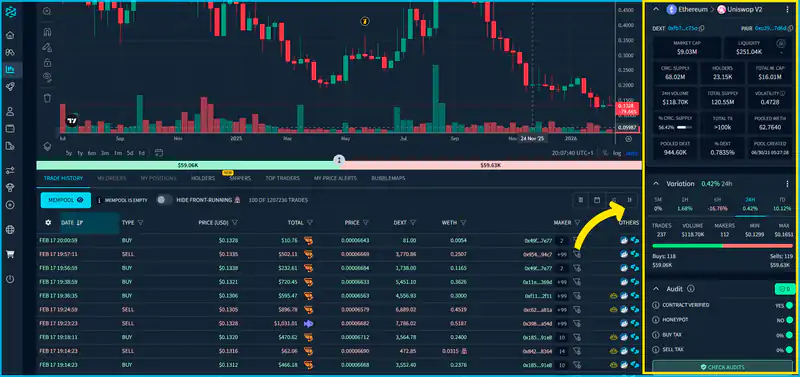

Main token info (liquidity, volume, TMC, etc.) and Audits in DEXTools
Step 4: Use the Token Information and Audit Features
DEXTools includes a Token Information section where you can investigate deeper metrics:
-
Contract Verification: Whether the contract source has been verified on-chain. Unverified contracts are riskier.
-
Liquidity Lock Status: Liquidity that is “locked” (for a period) is generally more secure than unlocked liquidity, which can be pulled at any time.
-
Holder Distribution: See if a small number of wallets control the majority of the token supply, a common sign of potential manipulation.
-
Security Attributes / Audit Data: DEXTools aggregates security signals, sometimes powered by third-party audit APIs (like GoPlus) that include whether a token might be a honeypot, whether taxes are very high, or whether there are suspicious owner privileges in the contract.
These data points help in identifying smart contract red flags, situations where the token may be programmed to trap sellers.
5. Step 5: Check for Honeypot Flags
Although DEXTools does not perform a direct “sell simulation” like some standalone honeypot testers (e.g., Honeypot.is), it does provide indicators that help you assess honeypot risk:
-
Audit Warnings: Some tokens may have specific audit flags indicating possible honeypot behavior.
-
Trade Anomalies: If DEXTools shows a pattern where sells fail or you see repeated failed sell transactions reported in the activity feed, it’s often because the contract denies sells under certain conditions.
-
DEXTools Score and Reviews: Many tokens on DEXTools have a DEXTScore or user votes that reflect community sentiment about safety. Low scores can indicate potential risk.
Pair this information with other heuristic signs of honeypots: lack of significant sell volume, transaction errors on sell attempts, and claims of “hidden liquidity” or vague contract behavior. And remember: always DYOR (Do Your Own Research).
6. Step 6: Test With a Tiny Buy (If Safe to Do So)
A practical step many traders use (outside of automated tools) is the $10–$20 test trade: buy a very small amount of the token and then attempt to sell it immediately. If the sell fails or is blocked, that’s a clear honeypot indicator. Not all honeypots are caught by analytics alone: sometimes, only an actual sell attempt confirms it. This should only be done with amounts you are comfortable losing and after doing your analytics on DEXTools and other scanners.
7. Step 7: Combine With Other Tools for Best Results
DEXTools is powerful but not infallible. Honeypot detection is complex and contract logic can be obscured or obfuscated. Many traders combine DEXTools with dedicated honeypot detectors like Honeypot.is or Token Sniffer. These tools simulate buy/sell behavior and analyze contract flags not shown directly on DEXTools. Using multiple perspectives increases confidence in your analysis.
Conclusion: How to Check honeypots in crypto trading
To effectively check whether a token is a honeypot using DEXTools:
-
Fetch the official contract address.
-
Load the token in DEXTools and explore real-time data.
-
Examine liquidity, trade history, and holder distribution.
-
Review security attributes and audit warnings.
-
Look for patterns of sell failure or anomalies.
-
(Optional) Perform a small test trade.
-
Combine DEXTools insights with other honeypot checkers for thorough assessment.
Using DEXTools as part of your research arsenal gives you detailed on-chain market data, liquidity signals, community sentiment, and contract info, all of which are vital when assessing the safety of new or unfamiliar tokens.
Key Points
. A honeypot token lets users buy but blocks or sabotages selling, trapping funds.
. Always start with the official contract address from trusted sources.
. DEXTools provides real-time liquidity and trade history to spot sell anomalies.
. Use Token Information and audit flags to identify contract risks.
. Watch for low liquidity, failed sells, and concentrated token holders.
. A small test buy and sell can confirm potential honeypot behavior.
. Combine DEXTools with other dedicated scanners for maximum safety.
Access the DEXTools app here and start trading quickly and securely with the most powerful and versatile DeFi tools.
Disclaimer: This content is for informational and educational purposes only and is not financial advice. Cryptocurrency and DeFi trading carry significant risks, including potential loss of capital. DEXTools provides data and tools but does not guarantee protection against market or project risks.